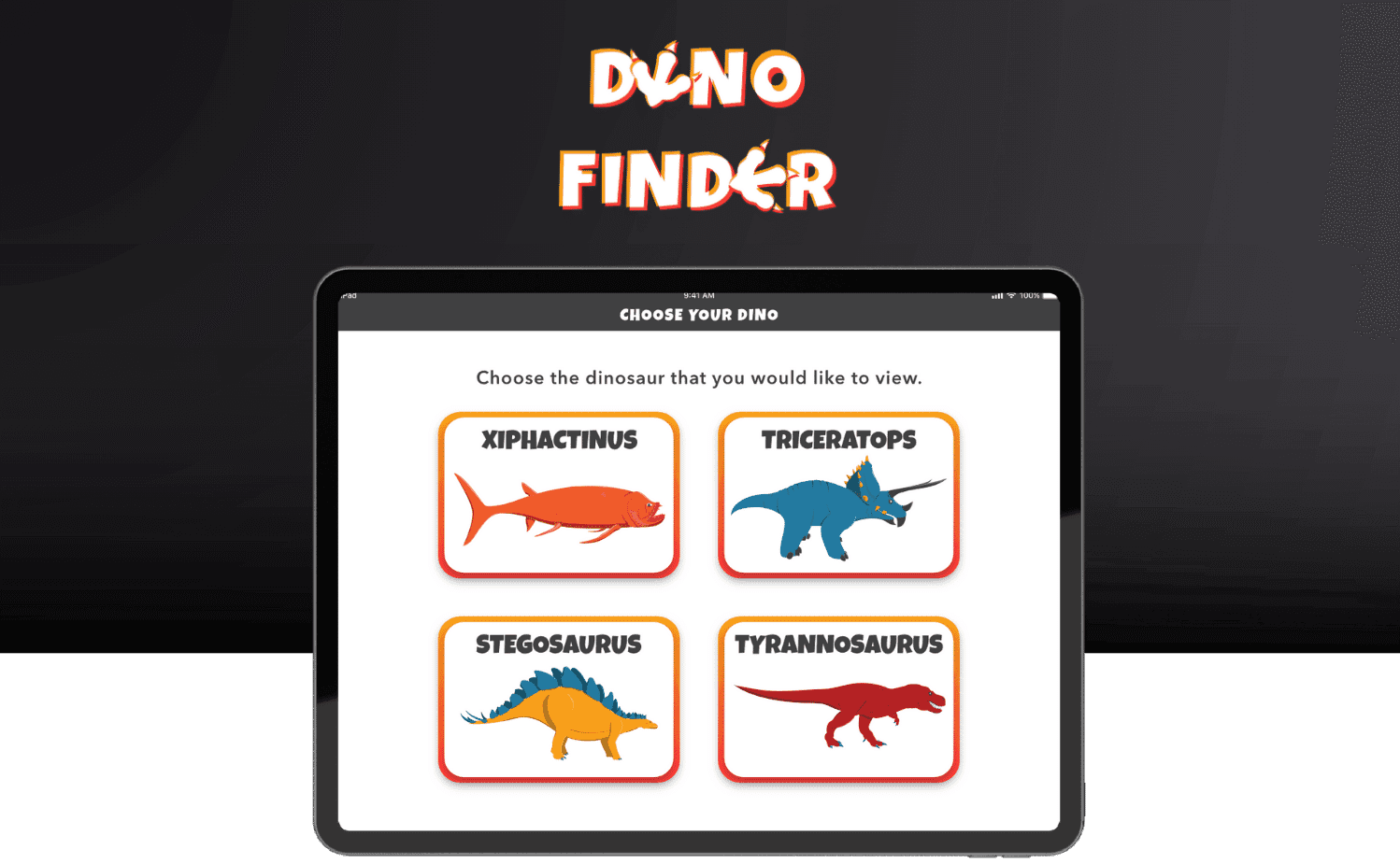
Dino Finder
Feb 2022- April 2022
An 11 week User Experience internship at Praxik LLC where 5 interns worked together with our project supervisor Anna Prisacari (Vice President of User Experience and Marketing) to design and develop an augmented reality (AR) solution for the Science Museum of Minnesota Paleo Exhibit.
Scope and Assignment
The Science of Museum of Minnesota (SMM) was hired as a client for the Praxik Internship. When working with the Science Museum, they stressed one simple question: "How can we increase the amount of interactivity and engagement within the Paleo Exhibit?"
Proposed Solution:
As a team of 6, we had to create, research for, and code an exciting augmented reality app for the Science Museum of Minnesota (SMM) in just 11 weeks.
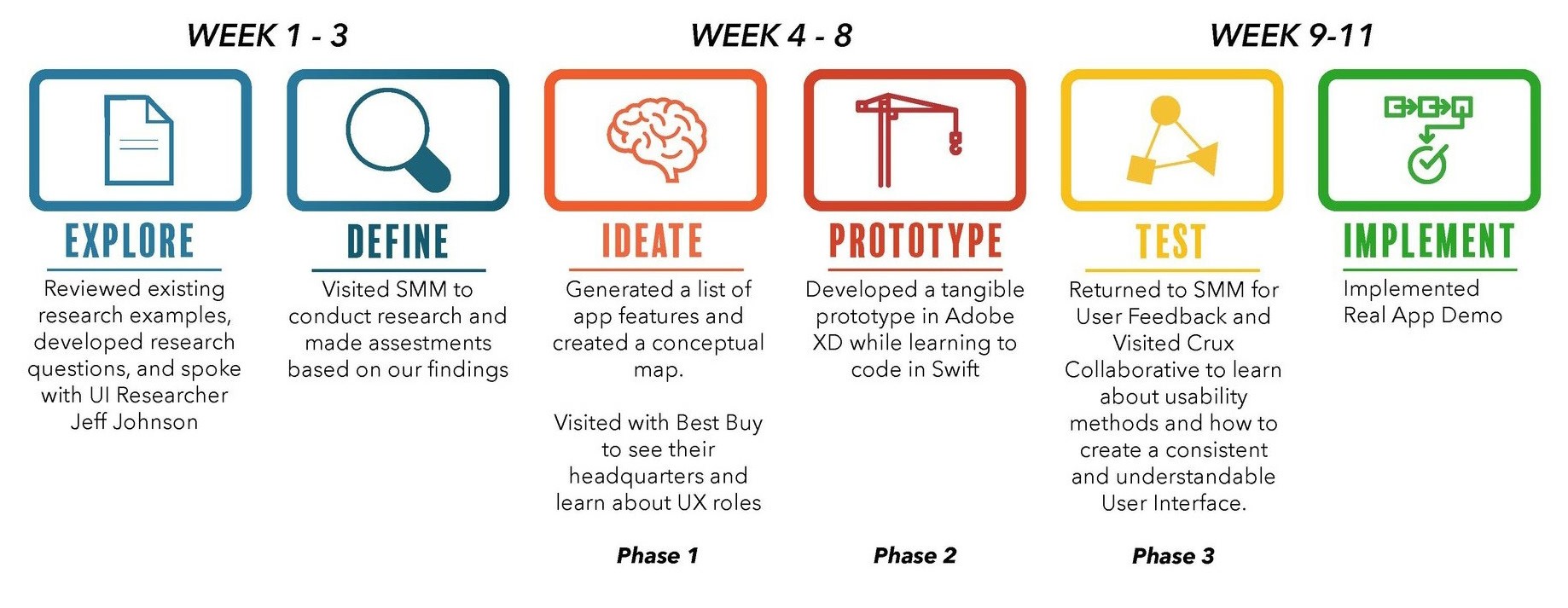
11-week roadmap for the product
Initial Research
Research was conducted to find museum attendee behavior as shown in the top picture. Demographics are displayed at the bottom. Our overarching research question was: How do museum visitors interact with the areas in the paleo exhibit without AR? Our research included a map outlining zones within the paleo exhibit. We conducted observatory in-person user research by tracing visitors paths and time their stay in each zone.
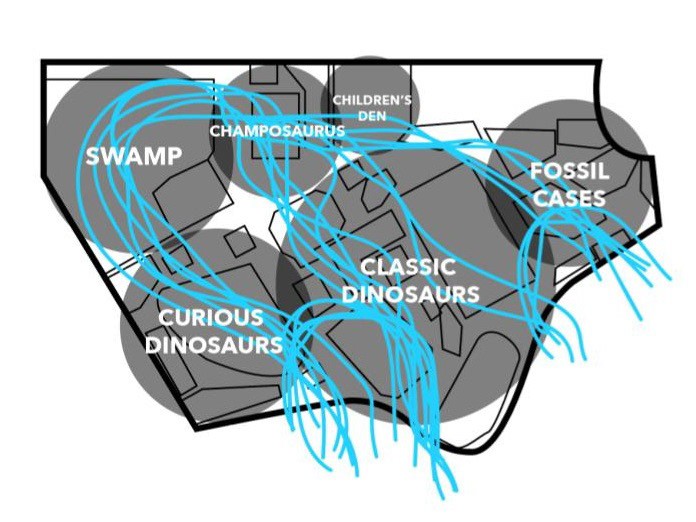
Heatmap of visitor path through the paleo exhibit
Secondary Research
Research was conducted to find museum attendee behavior. Demographics are displayed at the bottom. Our overarching research question was: How do museum visitors interact with the areas in the paleo exhibit without AR?
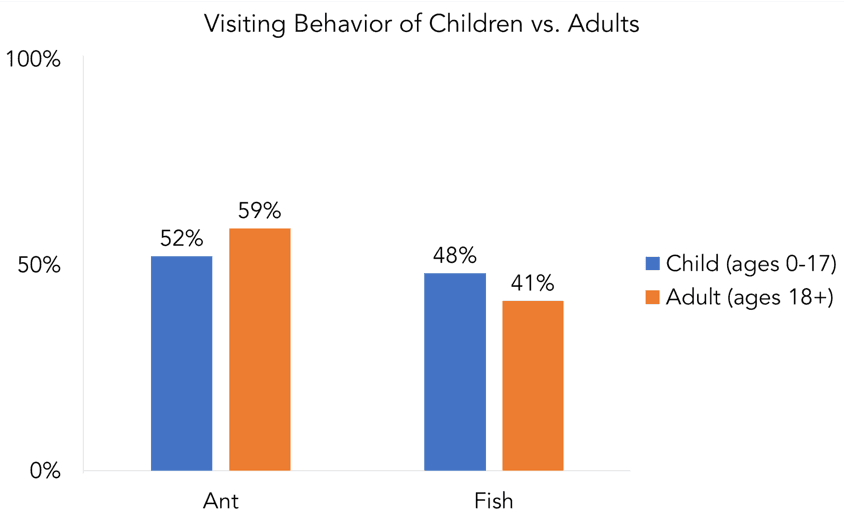
Visiting behavior of children vs adults
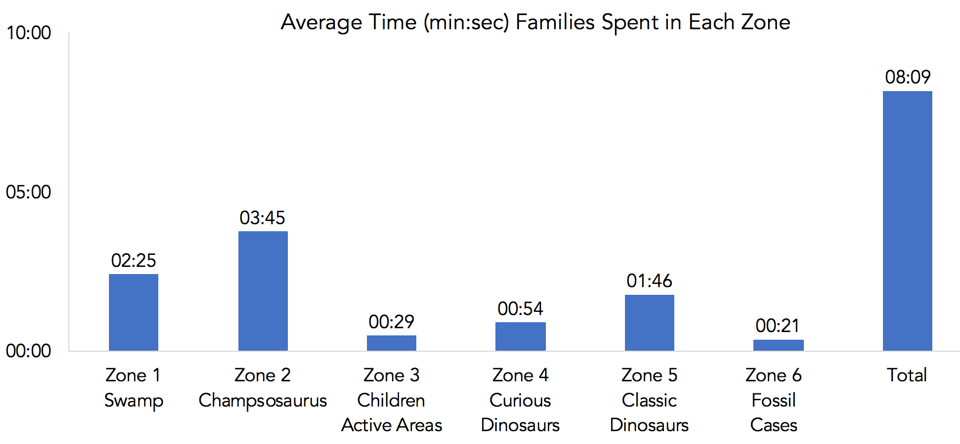
Average time spent in each zone of the paleo exhibit
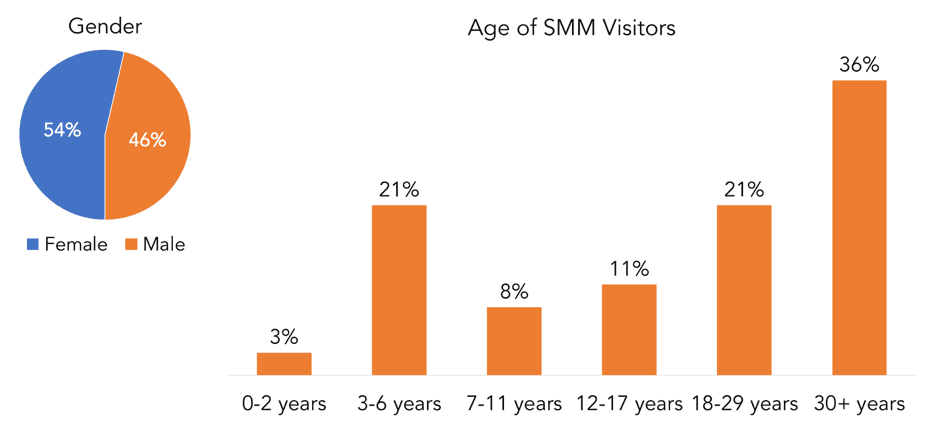
Average age of visitors
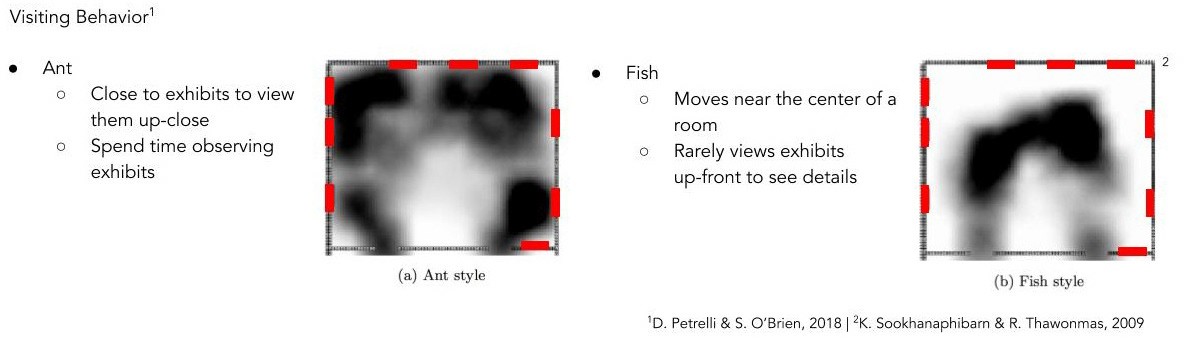
Visiting behavior classifications for museum attendees
Mobile Low-fidelity Prototype
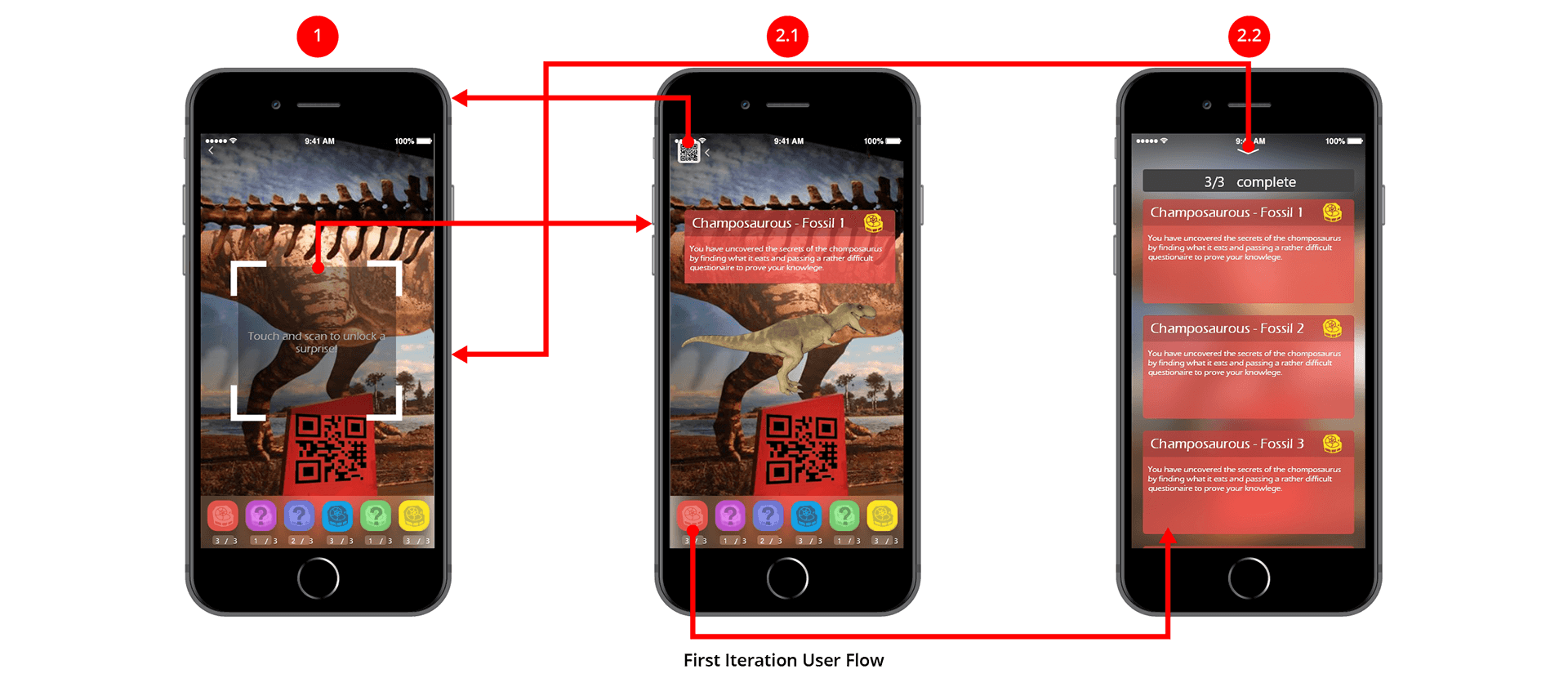
We built our first prototype based off 3 necessary app functions in order.
Visitors walk around the exhibit to see clearly marked custom dinosaur images that can be scanned on strategically placed IPads on mounted Gimbals.
After scanning the image, the app will notify the user that they’ve found a fossil and how many are left to find.
Each scannable image is located adjacent to the AR iPad Gimbal, allowing to see the dinosaur that they scanned.
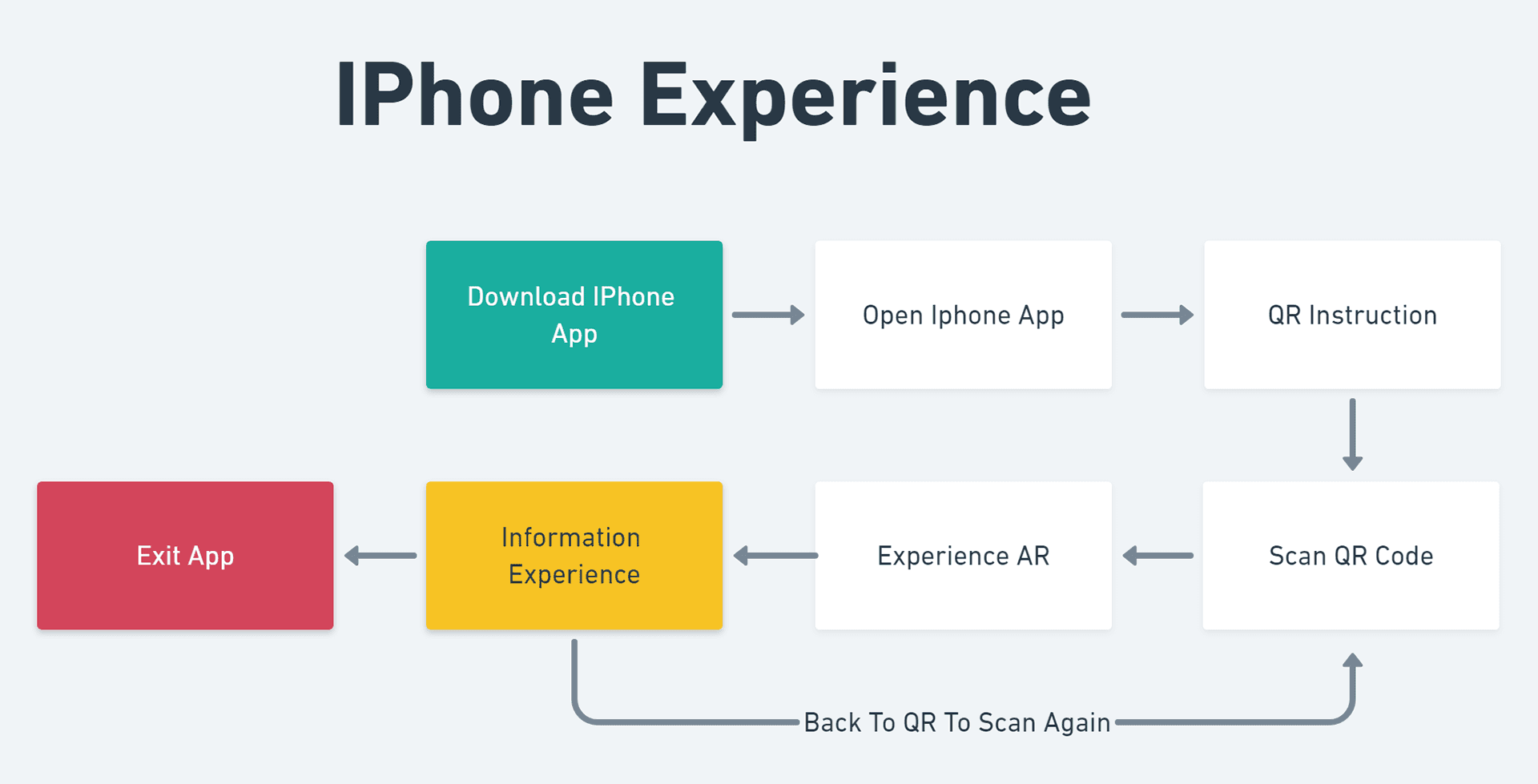
Key journey map
Prototype 1 - Basic functions
Introduction of the iPad: Information Architecture
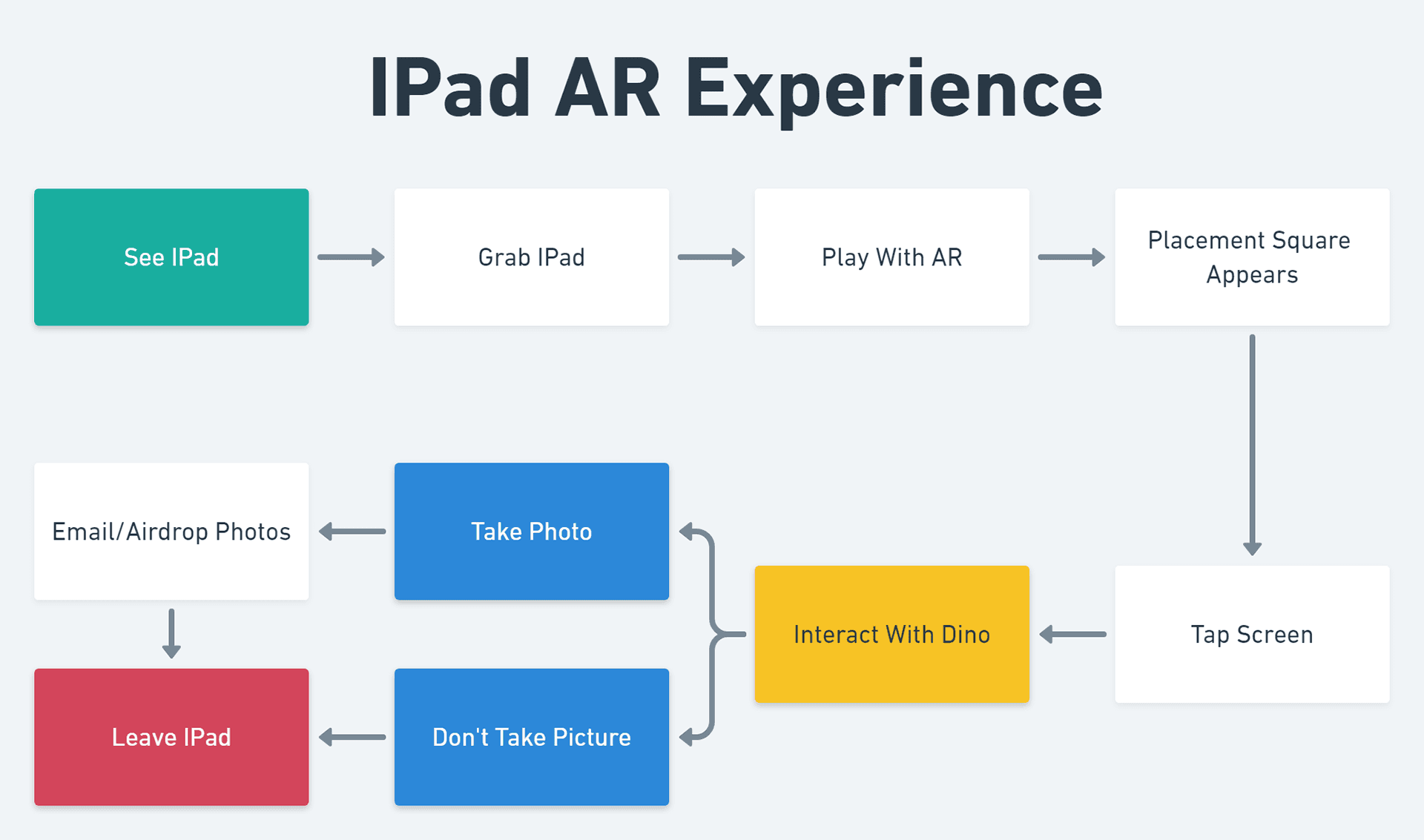
After prototyping our first app version, we looked back at our intended users and found most may not have immediate access to an iPhone or the willingness to download an app. Therefore, we decided to move the main bulk of the platform to an iPad experience, while still keeping the mobile version as a bonus!
Prototype 1 - Basic functions
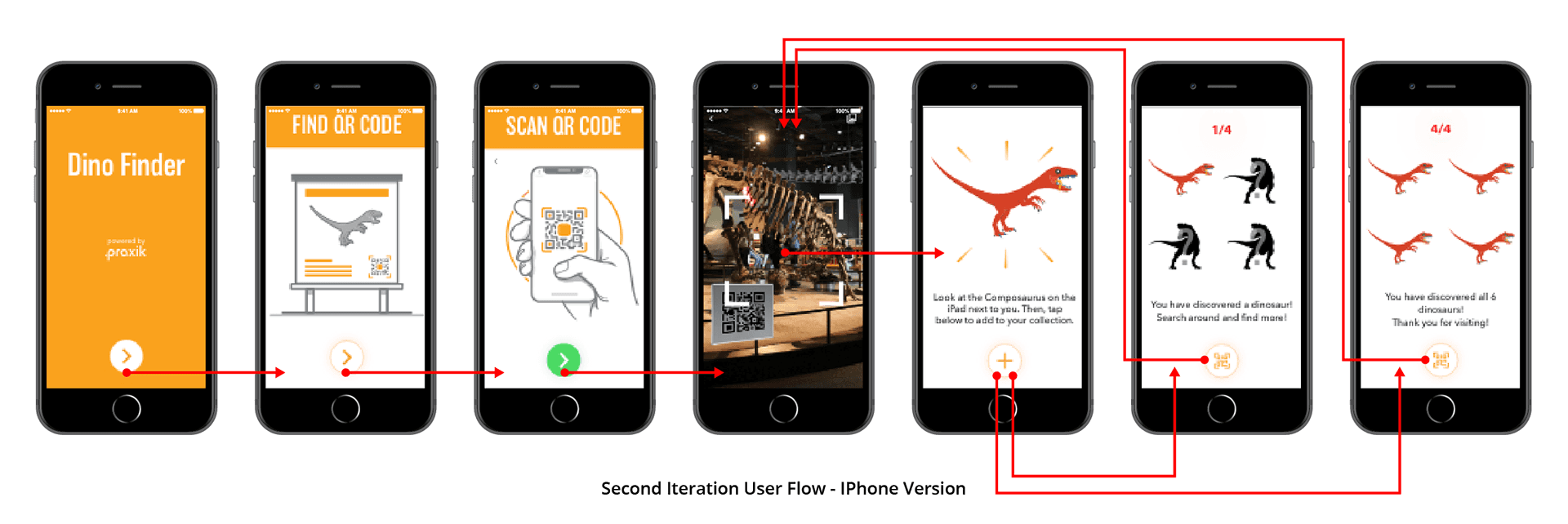
Prototype 2: Refined prototype
During Phase two, we integrated the museum’s style guide while also focusing on improving usability of the user interface to make the application more cohesive with the exhibit. While on a professional development field trip, we received feedback to:
Further simplify user interaction with buttons and improved navigation to allow for improved accessibility.
Conduct user testing with iPad and iPhone apps to see how visitors interacted.
Narrow 3D model collection down to 4 dinosaurs based on low-hit areas.
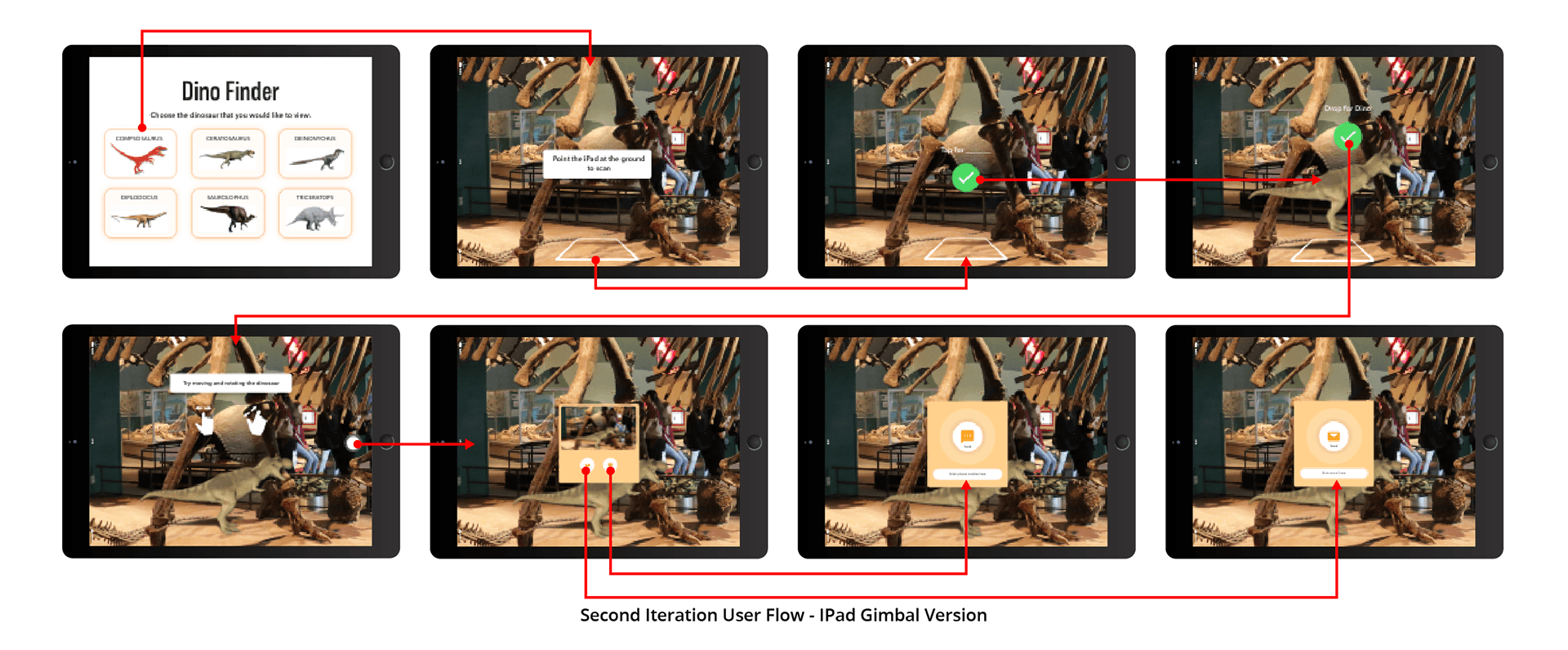
Before the final iteration, we conducted user testing on iPads to get real-user feedback with our second iteration of the application.
Prototype 1 - Basic functions
Prototype 1 - Basic functions
Live User Testing
For our second round of testing, we conducted evaluative research on our most current iPad AR prototype. We conducted a desirability test with the 5 most common words used to describe visitors experience with our prototype AR app was confusing, cutting edge, engaging, fun, and usable.Lastly, we performed a System Usability Scale, (SUS)
Out of 100, Our average score was 64, which means that we are between okay and good.
Despite this score, we still received positive feedback from visitors who tested Dino Finder.
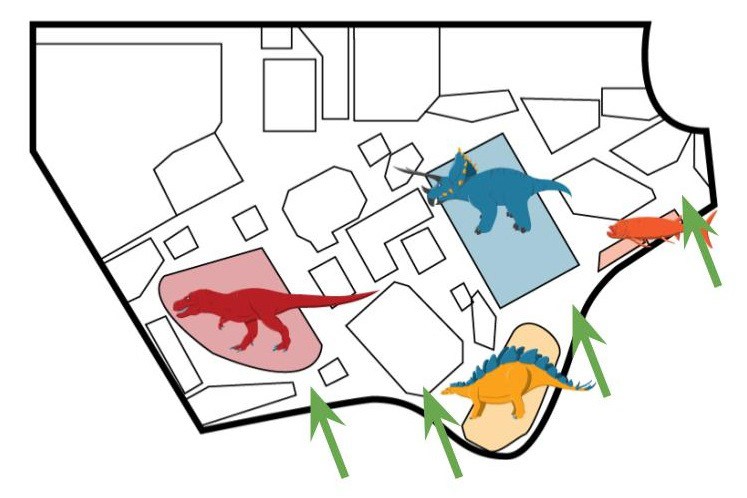
Prototype 1 - Basic functions
Vector Art
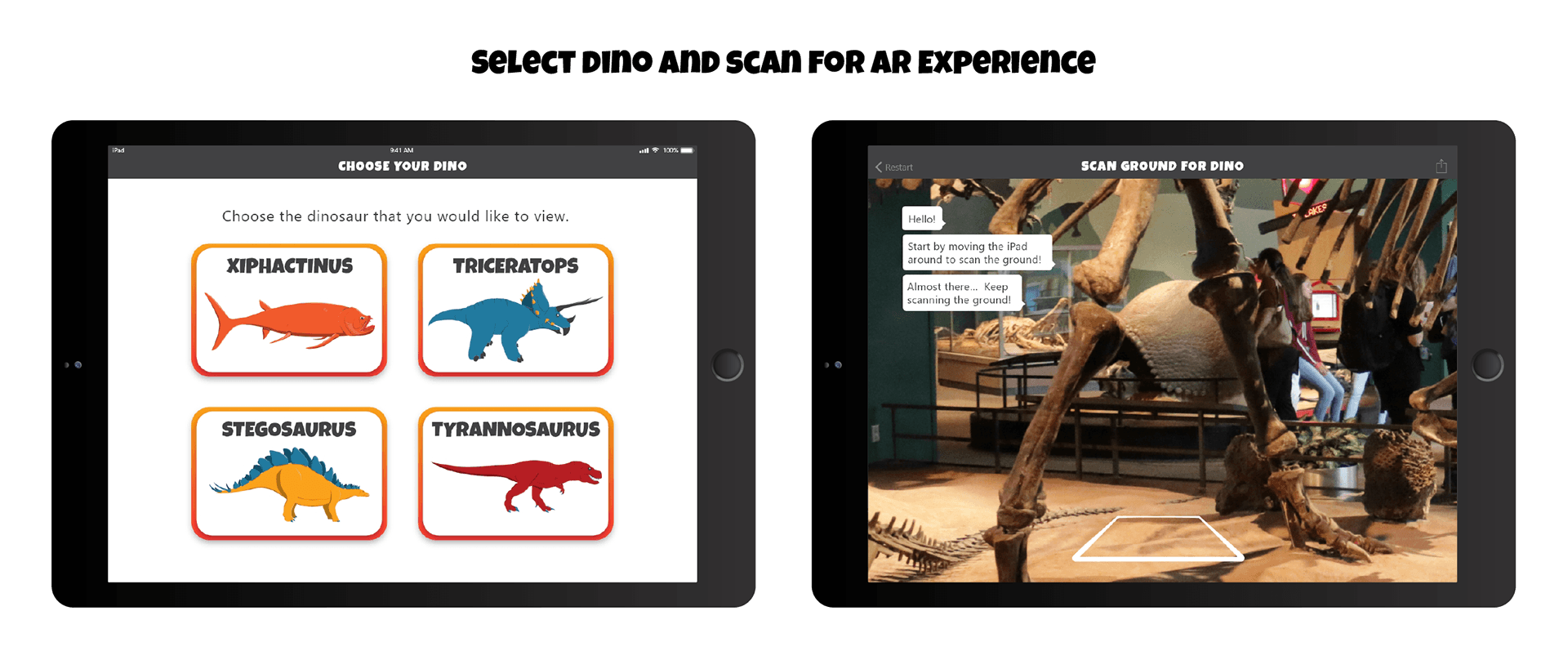
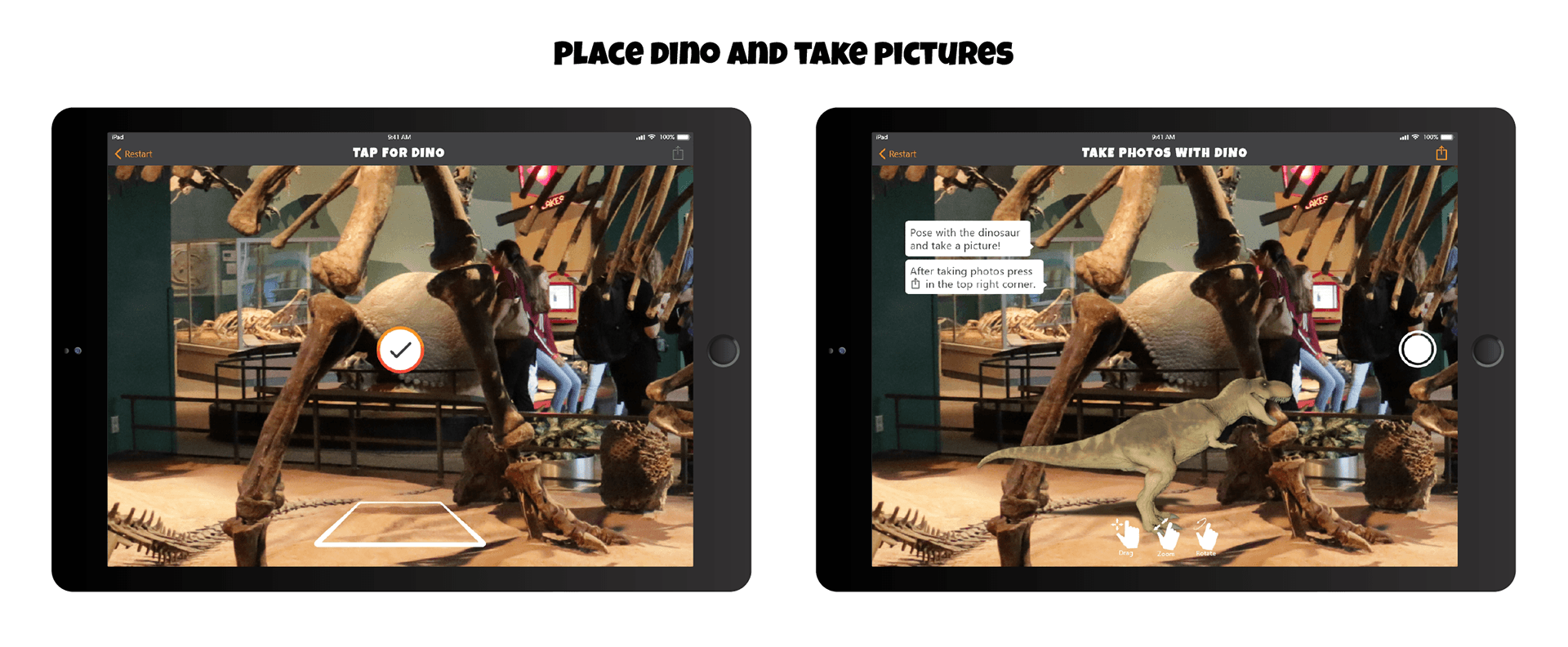
After user testing and one final round of testing, we completed our internship with a fully coded, developed, and designed AR app for the Ipad and Iphone.
Prototype 1 - Basic functions
Final Screens
After user testing and one final round of testing, we completed our internship with a fully coded, developed, and designed AR app for the Ipad and Iphone.

Dino Finder Product Logo
Dino Finder Wordmark
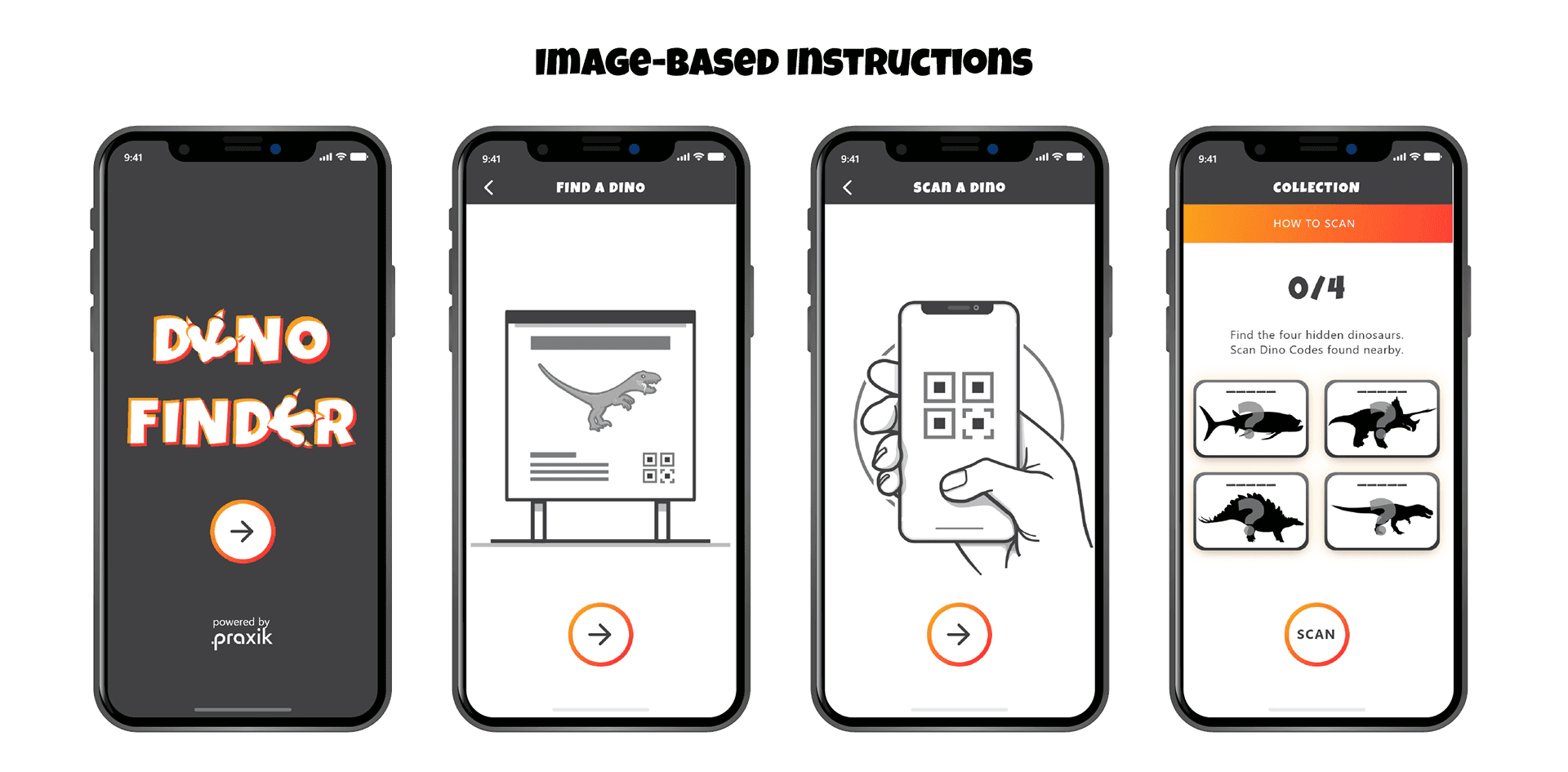
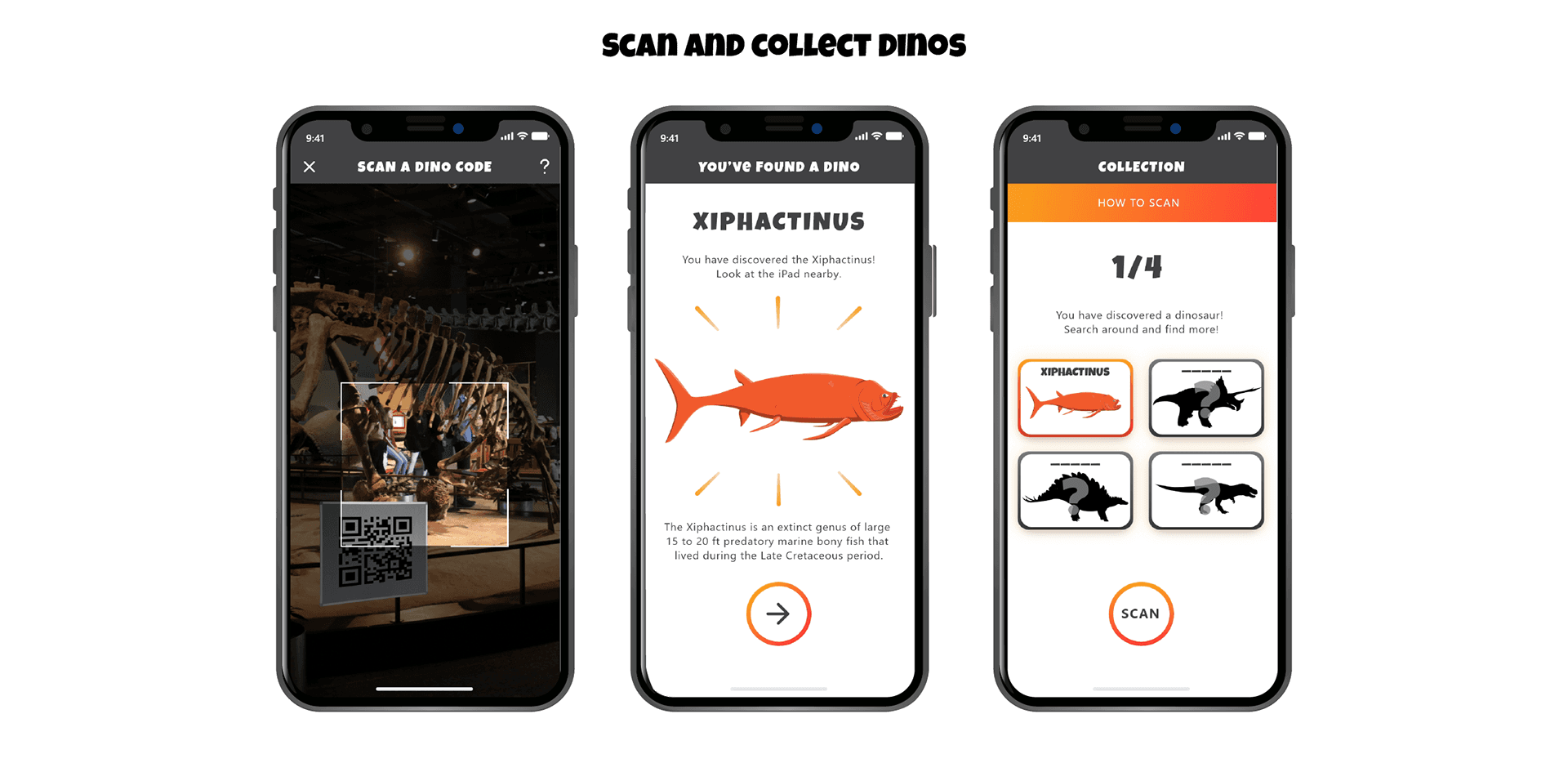
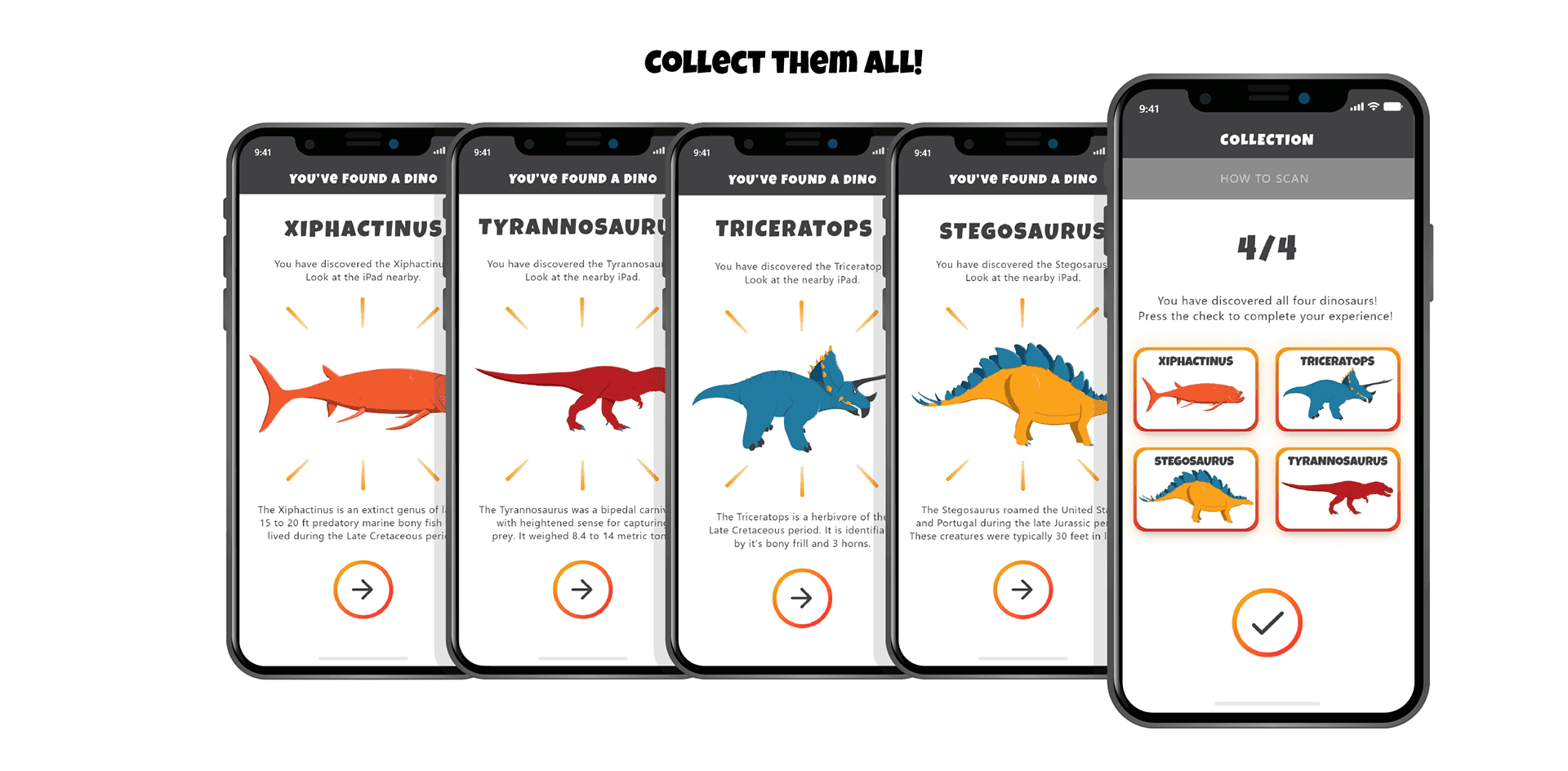
Dino Finder
Feb 2022- April 2022
An 11 week User Experience internship at Praxik LLC where 5 interns worked together with our project supervisor Anna Prisacari (Vice President of User Experience and Marketing) to design and develop an augmented reality (AR) solution for the Science Museum of Minnesota Paleo Exhibit.
Scope and Assignment
The Science of Museum of Minnesota (SMM) was hired as a client for the Praxik Internship. When working with the Science Museum, they stressed one simple question: "How can we increase the amount of interactivity and engagement within the Paleo Exhibit?"
Proposed Solution:
As a team of 6, we had to create, research for, and code an exciting augmented reality app for the Science Museum of Minnesota (SMM) in just 11 weeks.
11-week roadmap for the product
Initial Research
Research was conducted to find museum attendee behavior as shown in the top picture. Demographics are displayed at the bottom. Our overarching research question was: How do museum visitors interact with the areas in the paleo exhibit without AR? Our research included a map outlining zones within the paleo exhibit. We conducted observatory in-person user research by tracing visitors paths and time their stay in each zone.
Heatmap of visitor path through the paleo exhibit
Secondary Research
Research was conducted to find museum attendee behavior. Demographics are displayed at the bottom. Our overarching research question was: How do museum visitors interact with the areas in the paleo exhibit without AR?
Visiting behavior of children vs adults
Average time spent in each zone of the paleo exhibit
Average age of visitors
Visiting behavior classifications for museum attendees
Mobile Low-fidelity Prototype
We built our first prototype based off 3 necessary app functions in order.
Visitors walk around the exhibit to see clearly marked custom dinosaur images that can be scanned on strategically placed IPads on mounted Gimbals.
After scanning the image, the app will notify the user that they’ve found a fossil and how many are left to find.
Each scannable image is located adjacent to the AR iPad Gimbal, allowing to see the dinosaur that they scanned.
Key journey map
Prototype 1 - Basic functions
Introduction of the iPad: Information Architecture
After prototyping our first app version, we looked back at our intended users and found most may not have immediate access to an iPhone or the willingness to download an app. Therefore, we decided to move the main bulk of the platform to an iPad experience, while still keeping the mobile version as a bonus!
Prototype 1 - Basic functions
Prototype 2: Refined prototype
During Phase two, we integrated the museum’s style guide while also focusing on improving usability of the user interface to make the application more cohesive with the exhibit. While on a professional development field trip, we received feedback to:
Further simplify user interaction with buttons and improved navigation to allow for improved accessibility.
Conduct user testing with iPad and iPhone apps to see how visitors interacted.
Narrow 3D model collection down to 4 dinosaurs based on low-hit areas.
Before the final iteration, we conducted user testing on iPads to get real-user feedback with our second iteration of the application.
Prototype 1 - Basic functions
Prototype 1 - Basic functions
Live User Testing
For our second round of testing, we conducted evaluative research on our most current iPad AR prototype. We conducted a desirability test with the 5 most common words used to describe visitors experience with our prototype AR app was confusing, cutting edge, engaging, fun, and usable.Lastly, we performed a System Usability Scale, (SUS)
Out of 100, Our average score was 64, which means that we are between okay and good.
Despite this score, we still received positive feedback from visitors who tested Dino Finder.
Prototype 1 - Basic functions
Vector Art
After user testing and one final round of testing, we completed our internship with a fully coded, developed, and designed AR app for the Ipad and Iphone.
Prototype 1 - Basic functions
Final Screens
After user testing and one final round of testing, we completed our internship with a fully coded, developed, and designed AR app for the Ipad and Iphone.
Dino Finder Product Logo
Dino Finder Wordmark
Dino Finder
Feb 2022- April 2022
An 11 week User Experience internship at Praxik LLC where 5 interns worked together with our project supervisor Anna Prisacari (Vice President of User Experience and Marketing) to design and develop an augmented reality (AR) solution for the Science Museum of Minnesota Paleo Exhibit.
Scope and Assignment
The Science of Museum of Minnesota (SMM) was hired as a client for the Praxik Internship. When working with the Science Museum, they stressed one simple question: "How can we increase the amount of interactivity and engagement within the Paleo Exhibit?"
Proposed Solution:
As a team of 6, we had to create, research for, and code an exciting augmented reality app for the Science Museum of Minnesota (SMM) in just 11 weeks.
11-week roadmap for the product
Initial Research
Research was conducted to find museum attendee behavior as shown in the top picture. Demographics are displayed at the bottom. Our overarching research question was: How do museum visitors interact with the areas in the paleo exhibit without AR? Our research included a map outlining zones within the paleo exhibit. We conducted observatory in-person user research by tracing visitors paths and time their stay in each zone.
Heatmap of visitor path through the paleo exhibit
Secondary Research
Research was conducted to find museum attendee behavior. Demographics are displayed at the bottom. Our overarching research question was: How do museum visitors interact with the areas in the paleo exhibit without AR?
Visiting behavior of children vs adults
Average time spent in each zone of the paleo exhibit
Average age of visitors
Visiting behavior classifications for museum attendees
Mobile Low-fidelity Prototype
We built our first prototype based off 3 necessary app functions in order.
Visitors walk around the exhibit to see clearly marked custom dinosaur images that can be scanned on strategically placed IPads on mounted Gimbals.
After scanning the image, the app will notify the user that they’ve found a fossil and how many are left to find.
Each scannable image is located adjacent to the AR iPad Gimbal, allowing to see the dinosaur that they scanned.
Key journey map
Prototype 1 - Basic functions
Introduction of the iPad: Information Architecture
After prototyping our first app version, we looked back at our intended users and found most may not have immediate access to an iPhone or the willingness to download an app. Therefore, we decided to move the main bulk of the platform to an iPad experience, while still keeping the mobile version as a bonus!
Prototype 1 - Basic functions
Prototype 2: Refined prototype
During Phase two, we integrated the museum’s style guide while also focusing on improving usability of the user interface to make the application more cohesive with the exhibit. While on a professional development field trip, we received feedback to:
Further simplify user interaction with buttons and improved navigation to allow for improved accessibility.
Conduct user testing with iPad and iPhone apps to see how visitors interacted.
Narrow 3D model collection down to 4 dinosaurs based on low-hit areas.
Before the final iteration, we conducted user testing on iPads to get real-user feedback with our second iteration of the application.
Prototype 1 - Basic functions
Prototype 1 - Basic functions
Live User Testing
For our second round of testing, we conducted evaluative research on our most current iPad AR prototype. We conducted a desirability test with the 5 most common words used to describe visitors experience with our prototype AR app was confusing, cutting edge, engaging, fun, and usable.Lastly, we performed a System Usability Scale, (SUS)
Out of 100, Our average score was 64, which means that we are between okay and good.
Despite this score, we still received positive feedback from visitors who tested Dino Finder.
Prototype 1 - Basic functions
Vector Art
After user testing and one final round of testing, we completed our internship with a fully coded, developed, and designed AR app for the Ipad and Iphone.
Prototype 1 - Basic functions
Final Screens
After user testing and one final round of testing, we completed our internship with a fully coded, developed, and designed AR app for the Ipad and Iphone.
Dino Finder Product Logo
Dino Finder Wordmark